

Quickstart
Welcome to ConfigDirector, a cloud service to manage remote configuration and feature flags.
In this section we'll walk you through:
- Creating your first config
- Installing and configuring an SDK
- Retrieving the config in your app via the SDK
- Configuring contexts and targeting rules
1. Create your first config
- Sign in to the ConfigDirector dashboard. You'll be prompted to create a free account if you don't have one. Don't worry, it's free to start and does not require a payment method. You can start pay as you go later if you need more than the free allowance.
- Click on the
Createbutton next to theConfigsnavigation to create a new config. - Enter a key (the key is both the name and how you'll reference it in code) for the config, adjust other selections, and save it.
2. Install and configure an SDK for your language and framework
- Retrieve your client and server SDK keys by going to
SDK keysin the dashboard's navigation panel. - Select each environment to access its client and server SDK keys.
- Install and configure an SDK for your application stack:
npm install --save @configdirector/client-sdk
yarn add @configdirector/client-sdk
pnpm add @configdirector/client-sdk
bun add @configdirector/client-sdk
import { createClient } from "@configdirector/client-sdk";

export const client = createClient("YOUR-CLIENT-SDK-KEY");
await client.initialize();
npm install --save @configdirector/react-native-sdk
yarn add @configdirector/react-native-sdk
pnpm add @configdirector/react-native-sdk
bun add @configdirector/react-native-sdk
Also install @react-native-async-storage/async-storage, which works in Expo Go. Without it, the SDK cannot tell one app start from a new install: every start counts as one more monthly active user, nothing is kept on the device for the next start, and the SDK logs a warning.
npm install --save @react-native-async-storage/async-storage
yarn add @react-native-async-storage/async-storage
pnpm add @react-native-async-storage/async-storage
bun add @react-native-async-storage/async-storage
npx expo install @react-native-async-storage/async-storage
import { View } from "react-native";
import AwesomeApp from "./AwesomeApp";
import { ConfigDirectorProvider } from "@configdirector/react-native-sdk";

export default function App() {
  return (
    <ConfigDirectorProvider
      sdkKey={"YOUR-CLIENT-SDK-KEY"}
      appName="MyAwesomeApp"
      appVersion="1.0.0">
      <View>
        <AwesomeApp />
      </View>
    </ConfigDirectorProvider>
  );
};
npm install --save @configdirector/server-sdk
yarn add @configdirector/server-sdk
pnpm add @configdirector/server-sdk
bun add @configdirector/server-sdk
import { createClient } from "@configdirector/server-sdk";

// IMPORTANT: Do not commit the server SDK key to your source code, it is a secret value.
export const client = createClient("YOUR-SERVER-SDK-KEY");
await client.initialize();
npm install --save @configdirector/nextjs-sdk
yarn add @configdirector/nextjs-sdk
pnpm add @configdirector/nextjs-sdk
bun add @configdirector/nextjs-sdk
export async function register() {
  const { register } = await import("@configdirector/nextjs-sdk/server");
  await register({
    // The server SDK key is a secret value, do not commit it to your source code repository.
    // In this example, we are assuming the environment variable CONFIGDIRECTOR_SERVER_SDK_KEY
    // will be populated at runtime with your server SDK key in the server environment
    serverSdkKey: process.env["CONFIGDIRECTOR_SERVER_SDK_KEY"]!,
  });
}
import { ConfigDirectorProvider } from "@configdirector/nextjs-sdk/server";
import type { ReactNode } from "react";

export const dynamic = "force-dynamic";

export default async function RootLayout({ children }: { children: ReactNode }) {
  return (
    <html lang="en">
      <body>
        <ConfigDirectorProvider sdkKey={process.env["CONFIGDIRECTOR_CLIENT_SDK_KEY"]!}>
          <main>{children}</main>
        </ConfigDirectorProvider>
      </body>
    </html>
  );
}
npm install --save @openfeature/web-sdk @configdirector/openfeature-web-provider
yarn add @openfeature/web-sdk @openfeature/core @configdirector/openfeature-web-provider
pnpm add @openfeature/web-sdk @openfeature/core @configdirector/openfeature-web-provider
bun add @openfeature/web-sdk @openfeature/core @configdirector/openfeature-web-provider
import { OpenFeature } from "@openfeature/web-sdk";
import { ConfigDirectorProvider } from "@configdirector/openfeature-web-provider";

const provider = new ConfigDirectorProvider("YOUR-CLIENT-SDK-KEY");
try {
  await OpenFeature.setProviderAndWait(provider, {
    targetingKey: "12345", // In OpenFeature, the `targetingKey` represents the context's identifier
    name: "Example User",
    traits: {
      region: "North America", // Any arbitrary traits which can be referenced in targeting rules
    },
  });
} catch (error) {
  console.warn("Continuing until ConfigDirector sends config:", error);
}
const client = OpenFeature.getClient();
The provider connects with the context it has when it is registered. Pass the context you already know to setProviderAndWait, or set it with OpenFeature.setContext before registering the provider, so the first connection carries it.
3. Retrieve config values
import { client } from "./config-director-setup"

// Retrieve the current value
const value = client.getValue("my-config-key", false);

// Subscribe to value updates
const unwatchMyKey = client.watch(
  "my-config-key",
  false,
  (newValue) => {
    console.log("Value updated:", newValue)
  },
);

unwatchMyKey(); // Call the unwatch function returned to remove the listener

client.unwatch("my-config-key"); // Removes all listeners for that key
import { Text } from "react-native";
import { useConfigValue } from "@configdirector/react-native-sdk";

function YourComponent() {
  const { value } = useConfigValue("my-config-key", false);

  return <Text>my-config-key: {String(value)}</Text>;
}

export default YourComponent;
Retrieving config values via getValue, and subscribe to updates via watch:
import { client } from "./config-director-setup"

// Retrieve the current value
client.getValue("my-config-key", false);

// Subscribe to value updates
const unwatchMyKey = client.watch("my-config-key", false, (newValue) => {
  console.log("Value updated:", newValue);
});

unwatchMyKey(); // Call the unwatch function returned to remove the listener

client.unwatch("my-config-key"); // Removes all listeners for that key
Retrieving config values in client components:
"use client";

import { useConfigValue } from "@configdirector/nextjs-sdk/client";

function YourComponent() {
  const { value } = useConfigValue("my-config-key", false);

  return (<p>my-config-key: {value}</p>);
}

export default YourComponent;
Retrieving config values in server routes:
import { getConfigClient } from "@configdirector/nextjs-sdk/server";

export async function GET() {
  const client = getConfigClient();
  const value = client.getValue("my-config-key", false);
  return Response.json({ "my-config-key": value });
}
const booleanValue = client.getBooleanValue("my-config-key", false);

const stringValue = client.getStringValue("my-string-config-key", "Default");
4. Configure contexts and targeting rules
- With any of our SDKs you can provide an optional context with attributes that can be leveraged in targeting rules. A context describes a user unless you give it another context kind, such as a device or a tenant. Choose your SDK for instructions on how to provide a context:
A context can be provided when initializing the client:
import { createClient } from "@configdirector/client-sdk";

export const client = createClient("YOUR-CLIENT-SDK-KEY");
await client.initialize({
  id: "12345",
  name: "Example User",
  traits: {
    region: "North America", // Any arbitrary traits which can be referenced in targeting rules
  }
});
The context can also be updated via updateContext:
import { client } from "./config-director-setup"

await client.updateContext({
  id: "654321",
  name: "Another User",
  traits: {
    region: "Australia",
  },
});

// Update it to `undefined` (anonymous user context) when a user signs out
await client.updateContext();
To evaluate configs for an entity other than a user, such as a tenant, set the context kind with kind:
await client.updateContext({
  id: "acme",
  kind: "tenant",
  name: "Acme Inc.",
  traits: {
    plan: "enterprise",
  },
});
Leaving kind out means user. A context kind is 1 to 64 lowercase letters, digits, dashes, or underscores. A context with an invalid context kind is ignored: the SDK logs an error, and configs are evaluated as if no context had been given. Context kinds are available from version 1.7.0 of the SDK.
The app connects with the context given to the provider's context prop. Give it there when you already know the context as the app starts, so the first connection carries it:
import { View } from "react-native";
import AwesomeApp from "./AwesomeApp";
import { ConfigDirectorProvider } from "@configdirector/react-native-sdk";
export default function App() {
return (
<ConfigDirectorProvider
sdkKey={"YOUR-CLIENT-SDK-KEY"}
appName="MyAwesomeApp"
appVersion="1.0.0"
context={{ id: "12345", name: "Example User", traits: { region: "North America" } }}>
<View>
<AwesomeApp />
</View>
</ConfigDirectorProvider>
);
};
To change the context afterwards, for example when a user signs in, call updateContext from the useContext hook where the change happens. Each updateContext call opens a new connection with the new context:
import { Button, Text, View } from "react-native";
import { useConfigValue, useContext } from "@configdirector/react-native-sdk";
function YourComponent() {
const { value } = useConfigValue("my-config-key", false);
const { updateContext } = useContext();
const onUpdate = async () => {
await updateContext({
id: "654321",
name: "Another User",
traits: {
region: "Australia",
},
});
};
return (
<View>
<Text>my-config-key: {String(value)}</Text>
<Button title="Update context" onPress={onUpdate} />
</View>
);
}
export default YourComponent;
Rendering the provider with a different context prop updates the context the same way.
To evaluate configs for an entity other than a user, such as a tenant, set the context kind with kind:
updateContext({
  id: "acme",
  kind: "tenant",
  name: "Acme Inc.",
  traits: {
    plan: "enterprise",
  },
});
Leaving kind out means user. A context kind is 1 to 64 lowercase letters, digits, dashes, or underscores. A context with an invalid context kind is ignored: the SDK logs an error, and configs are evaluated as if no context had been given. Context kinds are available from version 1.7.0 of the SDK.
The context can be provided as the third argument to getValue. Unlike client SDKs, the server SDKs are able to evaluate targeting rules for the given context locally without additional network calls.
import { client } from "./config-director-setup"

client.getValue("my-config-key", false, {
  id: "12345",
  name: "Example User",
  traits: {
    region: "North America", // Any arbitrary traits which can be referenced in targeting rules
  },
});
It can also be provided as the fourth argument to watch:
import { client } from "./config-director-setup"

const unwatchMyKey = client.watch(
  "my-config-key",
  false,
  (newValue) => console.log("Value updated:", newValue),
  {
    id: "12345",
    name: "Example User",
    traits: {
      region: "North America",
    },
  },
);
To evaluate configs for an entity other than a user, such as a tenant, set the context kind with kind:
client.getValue("my-config-key", false, {
  id: "acme",
  kind: "tenant",
  name: "Acme Inc.",
  traits: {
    plan: "enterprise",
  },
});
Leaving kind out means user. A context kind is 1 to 64 lowercase letters, digits, dashes, or underscores. A context with an invalid context kind is ignored: the SDK logs an error, and configs are evaluated as if no context had been given. Context kinds are available from version 1.10.0 of the SDK.
The browser connects with the context given to the provider's context prop. Give it there when the page loads, for example from a cookie read in the root layout as shown in Configure the client provider, so the first connection carries it.
To change the context afterwards, for example when a user signs in, call updateContext from the useContext hook where the change happens:
"use client";

import { useConfigValue, useContext } from "@configdirector/nextjs-sdk/client";

function YourComponent() {
  const { value } = useConfigValue("my-config-key", false);
  const { updateContext } = useContext();

  const onUpdate = async () => {
    await updateContext({
      id: "654321",
      name: "Another User",
      traits: {
        region: "Australia",
      },
    });
  };

  return (
    <div>
      <p>my-config-key: {String(value)}</p>
      <button type="button" onClick={onUpdate}>
        Update context
      </button>
    </div>
  );
}

export default YourComponent;
Rendering the provider with a different context prop updates the context the same way.
A context given while the page first renders goes out with the first connection, whether it comes from the provider's context prop or from an updateContext call in an effect that runs when a component mounts: the browser connects once the page's first render and its effects are done. updateContext is the same function on every render, so it is safe to list in an effect's dependencies. A context equal to the one the provider already has, given through the prop or through updateContext, opens no new connection.
On server routes, the context is provided at evaluation time as the third argument to getValue. Unlike client SDKs, the server SDKs are able to evaluate targeting rules for the given context locally without additional network calls.
import { getConfigClient } from "@configdirector/nextjs-sdk/server";

export async function GET() {
  const client = getConfigClient();
  const value = client.getValue("my-config-key", false, {
    id: "654321",
    name: "Another User",
    traits: {
      region: "Australia",
    },
  });
  return Response.json({ "my-config-key": value });
}
To evaluate configs for an entity other than a user, such as a tenant, set the context kind with kind. It works the same in updateContext and in getValue:
const value = client.getValue("my-config-key", false, {
  id: "acme",
  kind: "tenant",
  name: "Acme Inc.",
  traits: {
    plan: "enterprise",
  },
});
Leaving kind out means user. A context kind is 1 to 64 lowercase letters, digits, dashes, or underscores. A context with an invalid context kind is ignored: the SDK logs an error, and configs are evaluated as if no context had been given. Context kinds are available from version 1.10.0 of the SDK.
The provider connects with the context it has when it is registered, as shown in Configure and initialize the client. To change the context afterwards, for example when a user signs in, call OpenFeature.setContext. Each change opens a new connection with the new context:
await OpenFeature.setContext({
  targetingKey: "654321",
  name: "Another User",
  traits: {
    region: "Australia",
  },
});
To evaluate flags for an entity other than a user, such as a tenant, set the context kind with a top-level kind attribute:
await OpenFeature.setContext({
  targetingKey: "acme",
  kind: "tenant",
  name: "Acme Inc.",
  traits: {
    plan: "enterprise",
  },
});
Leaving kind out means user. A kind inside traits is an ordinary trait, not the context kind. A context kind is 1 to 64 lowercase letters, digits, dashes, or underscores. A context with an invalid context kind is ignored: the SDK logs an error, and flags still resolve successfully, as if no context had been given. Context kinds are available from version 1.7.0 of the provider.
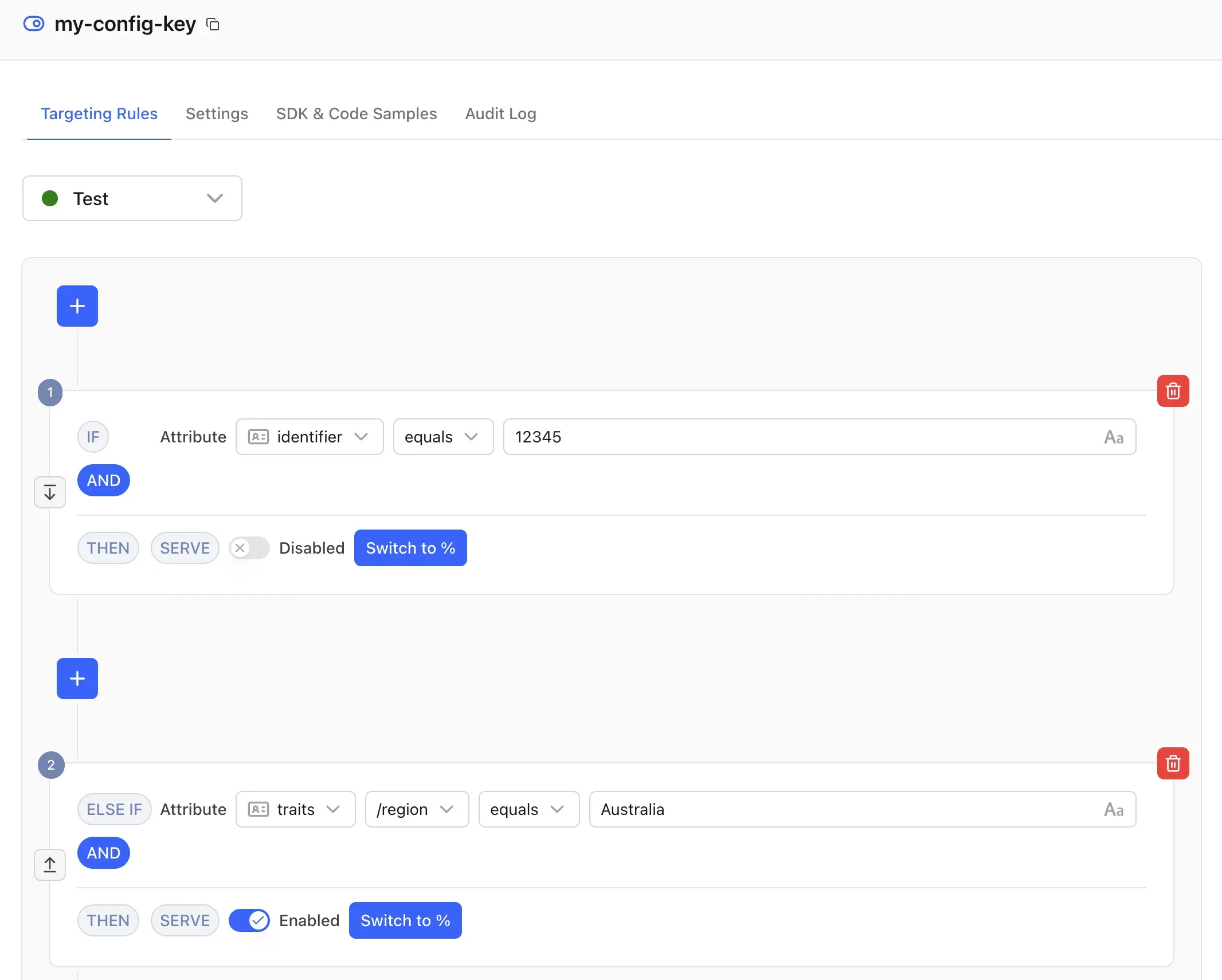
- You can now configure targeting rules by navigating to your config in the dashboard. Targeting rules are the very first tab on the config view:
Next steps
Prefer to manage projects, configs, targeting rules, and segments as code, or from an AI coding assistant? See the Terraform provider and the MCP server.